
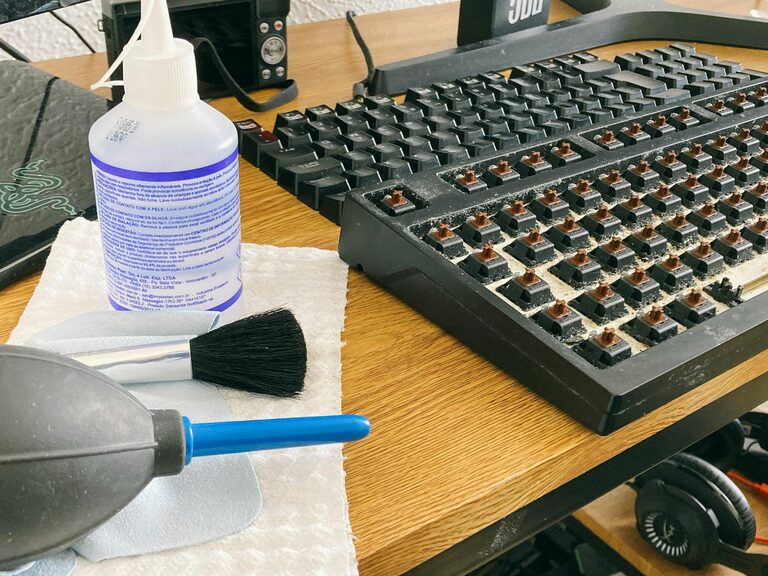
Keeping your phone and keyboard clean is essential for both hygiene and device longevity. These frequently used gadgets can accumulate dirt, oils, and germs over time. However, cleaning them improperly can lead to damage. In this post, we’ll walk you through the best ways to clean your phone and keyboard safely and effectively.
Why You Should Regularly Clean Your Phone and Keyboard
Our devices collect bacteria and dust just from daily use. Phones go everywhere with us — from our hands to pockets, tables, and more — while keyboards get touched repeatedly during work or play. Regular cleaning helps:
– Reduce germs and potential illnesses
– Improve device performance by preventing debris buildup
– Maintain device appearance by avoiding stains and smudges
What You’ll Need: Recommended Cleaning Supplies
Before starting, gather these basic items:
– Microfiber cloths (soft, lint-free)
– Isopropyl alcohol (70% or less) or screen-safe disinfectant wipes
– Distilled water (avoids mineral deposits)
– Cotton swabs or soft-bristled brush
– Compressed air canister (optional)
– Small bowl (for mixing solutions if needed)
Avoid household cleaners with bleach, ammonia, or other harsh chemicals, as these can damage screens and coatings.
How to Clean Your Phone Safely
Phone cleaning should be gentle yet thorough.
Step 1: Power Off and Unplug
Always turn off your phone and disconnect any cables before cleaning to prevent short circuits.
Step 2: Remove Case and Accessories
Take off the case, screen protectors, and any attachments to clean both the phone and accessories separately.
Step 3: Wipe Down the Exterior
Moisten a microfiber cloth with a 70% isopropyl alcohol solution or use approved disinfectant wipes. Avoid soaking the cloth — it should be damp, not wet. Gently wipe all surfaces, including the screen, back, and edges.
Step 4: Clean the Ports and Speakers
Use a dry cotton swab or a soft brush to remove dust and debris from charging ports, headphone jacks, and speaker openings. Avoid inserting anything sharp or metal to prevent damage.
Step 5: Dry and Reassemble
Allow the phone to air dry completely before putting the case back on and turning it on.
How to Clean Your Keyboard Safely
Whether you use a laptop or external keyboard, safe cleaning follows some specific steps.
Step 1: Unplug or Power Off
Disconnect the keyboard from your computer or switch off your laptop.
Step 2: Remove Loose Debris
Turn the keyboard upside down and gently shake it to dislodge crumbs and dust. You can also use compressed air to blow out particles from between the keys.
Step 3: Clean the Key Surfaces
Lightly dampen a microfiber cloth with distilled water or isopropyl alcohol solution (again, no more than 70%). Wipe the tops of the keys and keyboard surface carefully.
Step 4: Use Cotton Swabs for Tight Spaces
Dip a cotton swab in the cleaning solution, wring out excess liquid, and run it between the keys to clean crevices.
Step 5: Deep Cleaning (Optional)
For mechanical keyboards or if keys are removable, take off keycaps following your keyboard’s instructions and clean them separately in warm soapy water. Be sure to dry them thoroughly before reattaching.
Tips for Ongoing Device Hygiene
– Wash your hands before using devices to reduce transfer of oils and germs.
– Clean phones and keyboards at least once a week if used daily.
– Use screen protectors and keyboard covers to minimize dirt buildup.
– Avoid eating or drinking near your devices to prevent sticky residues and spills.
– Store your devices in clean, dust-free areas when not in use.
Conclusion
Regularly cleaning your phone and keyboard not only helps maintain good hygiene but also extends the life of your devices. By following these simple, safe steps using appropriate materials, you can keep your gadgets fresh, functional, and free from harmful germs. Take a few minutes weekly to care for your devices—it’s a small effort with big benefits!
—
Have you found any unique methods for cleaning your devices? Share your tips and experiences in the comments below!
